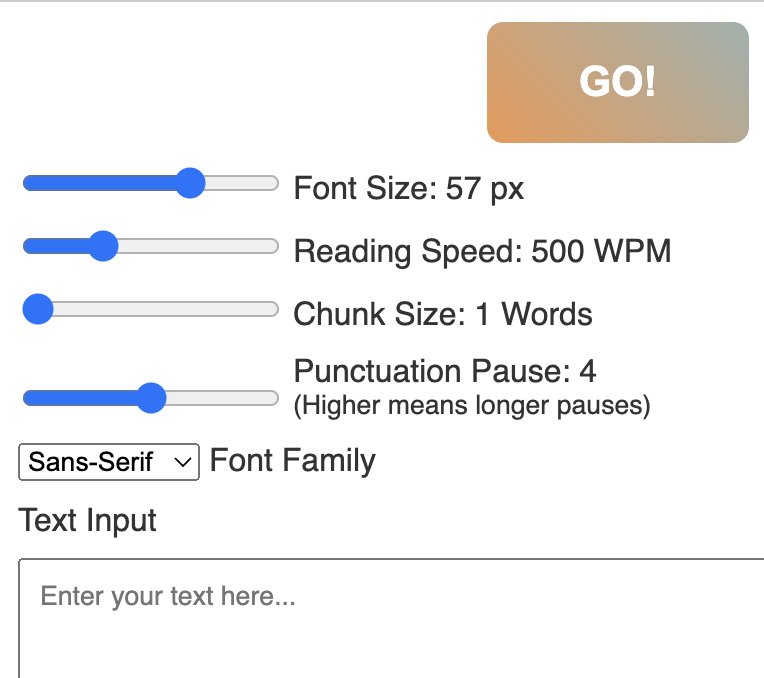
HotGato is a fast, flexible speed-reading app designed for people who want to consume more while spending less time. It’s free and open source for personal use, with commercial and corporate licensing available for teams and enterprises.
Highlights
- Always-free for personal users — download and run locally.
- Open source repository for developers who want to inspect or extend the app.
- Corporate licensing and support options for businesses that want hosted or customized deployments.
- Offline mode for reading sensitive or private documents without network access.
Core features
- Accurate WPM control: pick any words-per-minute target and fine-tune increments for gradual training.
- Chunk mode: choose how many words to present at once (single-word RSVP to multi-word chunks) to match your reading style.
- Punctuation-aware pauses: HotGato respects sentence boundaries and punctuation to make the output more natural and readable.
- Bionic reading mode: highlight focal parts of words to guide the eye and improve comprehension at high speeds.
- Export & import reading sessions: save your progress or share reading configurations across devices.
Why HotGato HotGato focuses on readability and control. Unlike purely experimental readers, it includes small but important features — punctuation pauses, chunk sizing, and bionic emphasis — that preserve comprehension while boosting throughput. Its offline capability makes it a practical choice for secure environments and users who prefer to keep content local.
Use cases
- Students and researchers scanning papers and textbooks.
- Professionals reviewing long reports, email archives, or legal documents.
- Casual readers who want to skim articles quickly without losing context.
- Organizations that want a branded or licensed speed-reading tool with support and deployment options.
Privacy and security HotGato was designed to run locally. Personal users can use it entirely offline so text never leaves the machine. Enterprise and paid deployments can be configured to meet data retention and compliance requirements; reach out for on-prem or VPC-based options.
Getting started
- Visit the link at the bottom of this page to download or open the web demo.
- Choose a mode: RSVP single-word, chunked, or bionic reading.
- Set your target WPM and adjust chunk size and pause behavior until the rhythm feels right.
- For corporate licensing or custom integrations, see the website for options.
Tips for effective training
- Start 200–300 WPM above your comfortable reading speed, then dial back if comprehension drops.
- Use short sessions (5–10 minutes) when you first adapt to chunked or bionic modes.
- Turn on punctuation pauses for dense, complex texts and off for light articles.
For developers and power users
- The source is available on GitHub; contributions and forks are welcome.
- The app is modular so you can swap rendering components, add new importers, or connect it to reading-tracking tools.